Create a Loyalty Program your customers find irresistible
We all know about loyalty programs right? How many cards do you have in your wallet? Do they make you loyal?
When creating or enhancing your own company's loyalty program, forget cold plastic in favour of a program that strengthens the emotional connection between your brand and your most profitable customers.
Are you offering a loyalty program for the right reasons?
- Because everyone else has one is not a reason!
- The right reason is to recognise and reward your most valuable customers in exchange for information that you can use to create products and services that more closely fit their needs and desires.
- Avoid the trap of rewarding frequency rather than loyalty.
- Do not play the discount-chasing game – you can't win it as the winner can only be the company which can offer the lowest price.
Personalise your loyalty program through smart data analysisA true loyalty program differs from frequency programs which give a benefit (such as discounts or points) in exchange for transactions. A true loyalty program solicits customer information you can leverage to create a unique reward --- one that your competitors cannot easily duplicate.
Don't stop at giving standard discounts on products, analyse you data and craft personalised offers on price-sensitive goods such as everyday products you may offer e.g. shampoo or margarine. Only send stuff that is relevant to your customerTwo key data analysis techniques:
Be selective in what you are looking for before you start looking, and know how you might put that knowledge to use if and when you obtain it.
Examine the data to confirm or dispute assumptions about your business. Ask your customer what they like, and then pay attention and give it to them. They will love you.
How Can Counter Intelligence Help You?
Loyalty Reward ProgramCI collects sales data and rewards members when they reach sales total values set by the store. Each time the member shops their accumulated points are shown on the receipt and they are advised how many more points they need to accumulate to receive the reward.
SUPER TIP - if you are really busy simply press F5 during the sale and create the customer account using their phone number. Get their details written down as you can come back at any time and update all their details
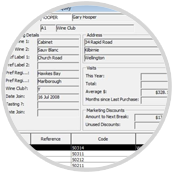 Click to EnlargeCustomer Marketing AnalysisTake a look at the Customer Marketing Data collected both at POS and via your On Account customers. In this example we are going to show how to use the data of a wine store who has wine tasting clients, a wine club and records products customers are purchasing. Kim Crawford has released a Reserve Sauvignon Blanc and the owner wants to advise all his members who have bought this label in the past but have not been in for more than 3 months.
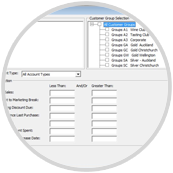 Click to EnlargeStep 1Select which group of customers you want to know about by branch and by Customer Group. Select the transactional criteria you are keen to make the selection on - e.g. people who have not visited the store in the last 3 months.
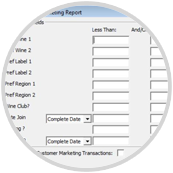 Click to EnlargeStep 2Personalise your selection criteria e.g. all the people in the Wine Club who have a preference for Sauvignon Blanc. Tick the Customer Marketing Transactions option.
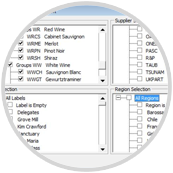 Click to EnlargeStep 3Select the product group Sauvignon Blanc and the label Kim Crawford.
Step 4Print the resulting file as a Word or Excel file for merging into an email program or Mail Merge Program. Make an exciting special offer to all recipients.
Super Tips
Super Tip #1 - How to attach the sale to a new customer when you don’t have much time at the counter to record all their information
- ask them for their phone number,
- press F5,
- enter the number in the code field (limit 8 characters),
- click search, if nothing is displayed click the "add" button,
- click OK and carry on with the sale.
Note how the sales screen now has linked this sale to that phone number. While wrapping or completing the payment process of the sale ask the client to fill out a form with personal details you want to collect - address, email etc. During the process you tell the customer the benefits of becoming a Loyalty member so they will readily part with their personal information. Later, when not so busy simply log on, click on F5 again, enter the persons phone number in the code field to recall the member and add the personal data. Escape (VOID) the sale, customers data will be updated.
Super Tip #2 - Thank the customerSend a letter / postcard / email thanking them for shopping with you and becoming a loyalty member.
Super Tip #3 - Use last 8 digits of customers phone number as customer account codeMost people these days have a mobile phone which will over come the problem of more than one person living at a location having an account with you. If a phone number is longer than 8 use the last 8 characters to create the code for the account (e.g. 0275314880 use 75314880) - we intend to increase the size of this field in a later release of our software but in the meantime when you have to do this make sure you also put the full number in the "phone" field because "search" will find it next time they visit you.
Super Tip #4 - Turn Marketing Analysis onmake sure you turn the Marketing Analysis on for all your On Account customers as well.
Guess what else?
You don’t need a physical loyalty card really - their phone number is their account number so they don’t need to remember a loyalty number. Do you always have your ONE Card for the supermarket with you? All customer data resides in your database and not on a card which means you can analyse it when you want.